Insights
What Is a Headless CMS and Should Your Business Be Using One?.
If you have been researching website options recently, you may have come across the term "headless CMS" and wondered what exactly it means — and more importantly, whether it is something your business should actually care about. The terminology sounds technical, and the concept is often explained in ways that assume a developer-level understanding of how websites work.
This guide explains what a headless CMS is in plain language, how it differs from the content management systems most businesses are already familiar with, and — most practically — how to know whether it is the right choice for your specific situation.
What Is a CMS, and Why Does the "Head" Matter?
Before explaining what a headless CMS is, it helps to understand what a traditional CMS is and where the word "head" comes from in this context.
A Content Management System is the software that allows you or your team to add, edit, and organise content on your website without writing code. WordPress is the most widely known example — it provides a backend interface where you can write blog posts, update page text, add images, and manage your website's content through a visual editor.
In a traditional CMS like WordPress, the system handles two things simultaneously: the backend (where content is stored and managed) and the frontend (how that content is displayed to visitors in a browser). These two layers are tightly coupled — the CMS controls both where the content lives and how it is presented to users.
The "head" in this context refers to the frontend — the part of the website that users actually see and interact with. In a traditional CMS, the head is attached to the body. Everything is connected and managed through the same system.
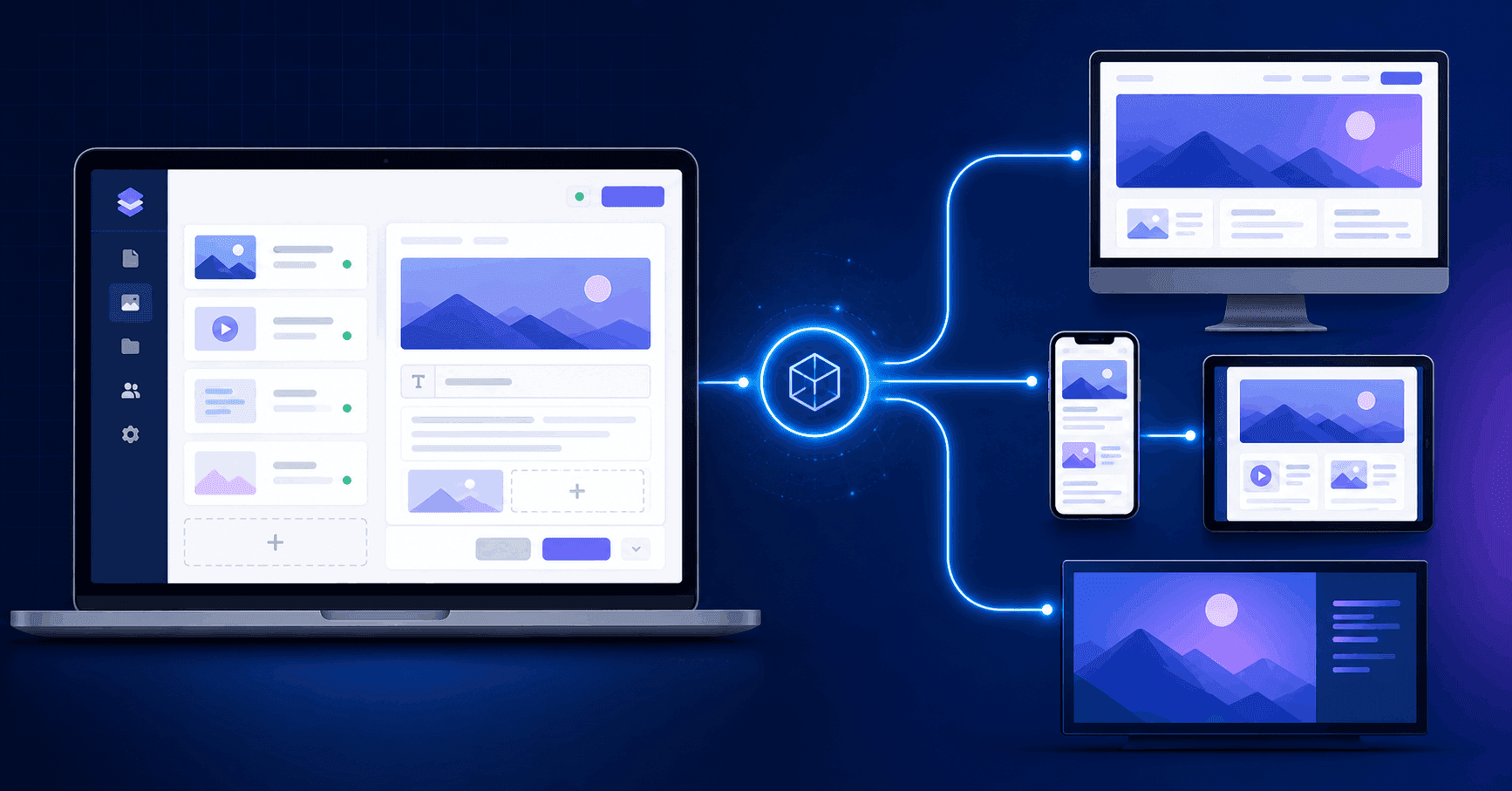
A headless CMS separates these two layers entirely. It handles the backend — storing and organising your content — but it has no built-in frontend at all. Instead, it delivers content through an API (Application Programming Interface) to whatever frontend you choose to build, whether that is a website, a mobile app, a digital screen, or any other digital surface that can consume content.
The CMS has no head. Hence, headless.
How a Traditional CMS and a Headless CMS Compare
The difference is easier to understand through a practical illustration.
With a traditional WordPress website, when a visitor loads your homepage, WordPress retrieves the content from its database, applies your theme's templates and styling, and delivers a complete, pre-rendered HTML page to the visitor's browser. The content and the presentation are inseparable — WordPress decides both what to show and how to show it.
With a headless setup, your content lives in the headless CMS — perhaps Contentful, Sanity, or Strapi — and is accessible through an API. Your development team builds a completely separate frontend — perhaps using Next.js or React — that calls that API to retrieve the content it needs and displays it however the frontend is designed to. The content and the presentation are fully independent.
This separation sounds like an added layer of complexity, and in some respects it is. But it also creates a set of capabilities and advantages that a tightly coupled traditional CMS simply cannot provide — and for the right type of business, those advantages are genuinely significant.
The Real Advantages of a Headless CMS
Content can go anywhere.
This is the most transformative advantage of a headless architecture. Because your content is accessible through an API, the same content can be delivered to every digital channel simultaneously — your website, your iOS app, your Android app, a digital signage screen in your retail location, a smartwatch interface, a voice assistant — without any duplication of content management effort.
In a traditional CMS, managing content across multiple channels typically means maintaining separate content in each system. Update a product description, and you may need to update it in your website CMS, your mobile app, your ecommerce platform, and anywhere else it appears. With a headless CMS, you update it once and it flows to every channel automatically.
For businesses operating across multiple digital touchpoints — or planning to expand to them — this single-source-of-truth content model eliminates a significant amount of administrative overhead and reduces the risk of inconsistent information across channels.
Performance is genuinely better.
When a headless CMS delivers content through an API to a modern frontend framework like Next.js, the resulting pages can be statically generated — meaning they are pre-built as complete HTML files and served directly from a content delivery network (CDN) rather than assembled on a server each time someone makes a request.
The performance difference is real and measurable. Statically generated pages served from a CDN typically load significantly faster than dynamically rendered pages from a traditional CMS, particularly for users on mobile devices or slower connections. Given that Google uses page speed as a ranking factor and that loading time directly affects user engagement and conversion rates, this performance advantage has direct commercial consequences.
The frontend is completely unrestricted.
With a traditional CMS like WordPress, your frontend options are constrained by the theme and plugin ecosystem. Even with a custom theme, you are working within the structural and design constraints of how WordPress renders pages. Certain design approaches, interaction patterns, and technical implementations are difficult or impossible to achieve cleanly within the WordPress architecture.
A headless approach gives your frontend developers complete freedom. The frontend is just code — React, Next.js, Vue, or whatever technology is most appropriate for the project. There are no theme constraints, no plugin conflicts, and no CMS-imposed limitations on what the frontend can do or how it can be structured.
For businesses that want a genuinely distinctive, high-performance web presence that does not look or feel like every other WordPress site, this creative and technical freedom is a meaningful advantage.
Security is improved.
Traditional CMS platforms — particularly WordPress — are frequent targets for security attacks precisely because they are so widely used. The admin login page is well-known, the plugin ecosystem introduces third-party code with varying security quality, and a single vulnerability can compromise the entire site.
A headless CMS significantly reduces the attack surface. Because there is no publicly accessible CMS interface on the frontend, and because the content delivery is read-only through the API, the CMS itself is much harder to compromise through a web-based attack. The frontend, being a separately hosted static or server-rendered application, is also more straightforward to secure and harden.
Scaling is more efficient.
When a traditional CMS needs to handle a sudden spike in traffic — a viral article, a product launch, a flash sale — it must scale the entire server infrastructure, including the database and content rendering layer. This can be expensive and, if not properly configured, can result in slow performance or downtime under load.
A headless frontend served from a CDN scales almost automatically and at very low cost, because pre-built static files are extraordinarily efficient to serve at any volume. The backend CMS itself rarely needs to scale aggressively, because it is not serving traffic directly to end users.
The Trade-Offs — Where Headless CMS Is Not the Right Choice
With the advantages clearly outlined, it is equally important to be honest about the trade-offs — because headless is not the right choice for every business or every project.
Higher development cost and complexity.
Building a headless CMS setup requires more upfront development work than deploying a standard WordPress site. You need a team capable of building and maintaining a modern frontend — which requires React, Next.js, or similar skills — as well as configuring the headless CMS, setting up the API connections, and managing deployment infrastructure.
For a small business that needs a straightforward five-page brochure website and wants to update content occasionally, this additional complexity is rarely justified by the advantages. A well-built WordPress site with good hosting delivers a perfectly adequate result at a lower cost.
Content editors need to adjust.
Traditional CMS platforms like WordPress offer content editors a WYSIWYG (What You See Is What You Get) editing experience — they see a visual representation of how the page will look as they edit it. Most headless CMS platforms present content in a more structured, field-based interface that is divorced from the visual presentation.
Some editors find this adjustment straightforward. Others find the absence of visual context disorienting, particularly if they have been managing content in WordPress for years. This is worth factoring into the decision, particularly for organisations where content editing is handled by non-technical staff.
Preview functionality requires additional setup.
Because the headless CMS and the frontend are separate systems, previewing how new content will look before publishing requires explicit preview functionality to be built and configured. This is achievable — most modern headless CMS platforms support draft previews — but it is not automatic, and it requires additional development effort to implement well.
Some functionality requires custom development.
WordPress's plugin ecosystem means that a large amount of common functionality — ecommerce, event management, membership areas, forms, booking systems — can be added with existing plugins. A headless setup typically requires this functionality to be built custom or integrated through third-party services, which adds development cost.
Which Businesses Should Seriously Consider a Headless CMS?
Based on the advantages and trade-offs outlined above, here is a practical framework for identifying whether headless is right for your situation.
Headless is worth serious consideration if:
You need to deliver content to multiple digital channels — a website, a mobile app, digital signage, or other surfaces — and want to manage that content from a single source.
Performance is a genuine competitive differentiator for your business — particularly for ecommerce, SaaS, or media businesses where page speed directly affects conversion rates and revenue.
Your website has complex, custom functionality requirements that cannot be cleanly achieved within a traditional CMS architecture.
You are planning significant digital growth and want a technical foundation that will scale efficiently and not require a rebuild in two to three years.
Your development team has — or you are working with an agency that has — genuine experience with modern JavaScript frameworks and headless CMS platforms. A headless setup built by a team without this expertise often produces worse outcomes than a well-built traditional CMS site.
Headless is probably not the right fit if:
You need a straightforward brochure or informational website with standard functionality and a limited budget.
Your content editing team is non-technical and the visual editing experience of a traditional CMS is genuinely important for their productivity.
Your timeline is short and the additional development complexity of a headless architecture cannot be accommodated within the project schedule.
You are an early-stage business still validating your product or market, and your website needs to evolve rapidly based on what you learn.
The Hybrid Option — Headless for Some, Traditional for Others
It is also worth noting that the choice is not always binary. Some organisations run a hybrid architecture — using a headless CMS to power their primary website frontend while keeping certain sections (a blog, a resource library) on a more traditional CMS platform that editors are already comfortable with.
Similarly, some traditional CMS platforms — including newer WordPress configurations using the REST API or GraphQL — can be used in a "headless" mode, where WordPress handles the content management backend but a custom frontend is built separately. This approach gives you some of the benefits of headless while preserving the familiarity of the WordPress content editing experience.
Whether a pure headless, hybrid, or decoupled WordPress approach is right depends on the specific balance of requirements, team capabilities, and budget for your project.
Popular Headless CMS Platforms Worth Knowing
If you are exploring headless CMS options, these are the platforms most commonly used in commercial projects by experienced development teams:
- Contentful — One of the most widely used enterprise-grade headless CMS platforms. Excellent API, strong content modelling flexibility, and a well-developed ecosystem of integrations. Pricing scales with usage, which can become significant for larger content operations.
- Sanity — A developer-favourite with a highly flexible content schema system and a customisable editing interface (Sanity Studio). Strong real-time collaboration features and a generous free tier that makes it accessible for smaller projects.
- Strapi — An open-source headless CMS that can be self-hosted, giving you complete control over your data and infrastructure. Lower ongoing cost than SaaS alternatives, but requires server infrastructure management.
- Prismic — A user-friendly headless CMS with a strong focus on page building and visual editing, which helps bridge the gap for non-technical content editors. Popular for marketing-driven websites.
- Directus — Another open-source option with a clean interface and strong data management capabilities. Works well as a headless CMS layered on top of an existing database.
Making the Decision — What to Discuss With Your Development Partner
If you are evaluating whether a headless CMS is right for your next web project, the most productive starting point is a structured conversation with your development team or agency about your specific requirements.
The key questions to work through together include: How many digital channels does your content need to reach now and in the next three years? What are your performance requirements, and how directly does page speed affect your business outcomes? What is the technical capability of your content editing team, and how important is visual editing? What is your budget for both the initial build and ongoing maintenance? What custom functionality does your site need, and how cleanly can that functionality be integrated with a headless architecture?
An experienced web development company in Adelaide with genuine headless CMS implementation experience should be able to assess these requirements and give you an honest recommendation — including telling you clearly when a traditional CMS is the more appropriate choice, rather than defaulting to the more complex and expensive option regardless of fit.
The Bigger Picture — How Your CMS Choice Fits Into Your Digital Strategy
A CMS decision is not just a technical choice — it is a strategic one that affects how easily your team can produce and distribute content, how well your website performs, how your digital presence can scale, and how much your ongoing maintenance and development costs will be for years to come.
The web development services in Adelaide that deliver the best long-term outcomes are those that treat these decisions as part of a broader strategic conversation about where your digital presence needs to go — not just what needs to be built right now.
For businesses with genuinely multi-channel content requirements, ambitious performance standards, or complex frontend needs, headless CMS is increasingly the architecture that professional development teams recommend — and for good reason. For businesses with simpler requirements and tighter budgets, a well-built traditional CMS remains a completely sound choice.
The key is understanding which category your business actually falls into, so the architecture decision serves your real needs rather than the preferences or habits of whoever is building your site.
Final Thoughts
A headless CMS is a powerful architectural approach that delivers genuine advantages in performance, flexibility, scalability, and multi-channel content delivery — for the businesses and projects where those advantages matter. It is not a universal upgrade over traditional CMS platforms, and the additional cost and complexity it introduces is only justified when the specific requirements of the project warrant it.
Understanding what a headless CMS is, what it does differently from a traditional platform, and what the genuine trade-offs are puts you in a far better position to evaluate recommendations from your development team, ask the right questions during a project brief, and ultimately make a decision that serves your business's long-term digital needs rather than just the preferences of whoever is holding the keyboard.
For any business working with a software development company in Adelaide on a new web project, this is one of the most important early conversations to have — and the quality of the answer you receive is itself a useful indicator of the quality of the partner you are working with.